End the day knowing where you stand
A gentle record of your prayers: on time, late, or made up afterwards. Each day becomes a ring. And for the night after Isha, Khalis shows its middle and its last third, with an alarm for tahajjud. Your record is kept on your phone, and Khalis sends it nowhere, except to your own iCloud if you turn on sync.
- 3marks: on time, late, qada
- 4spans, from 7 days to a year
- 2night times on the Today screen
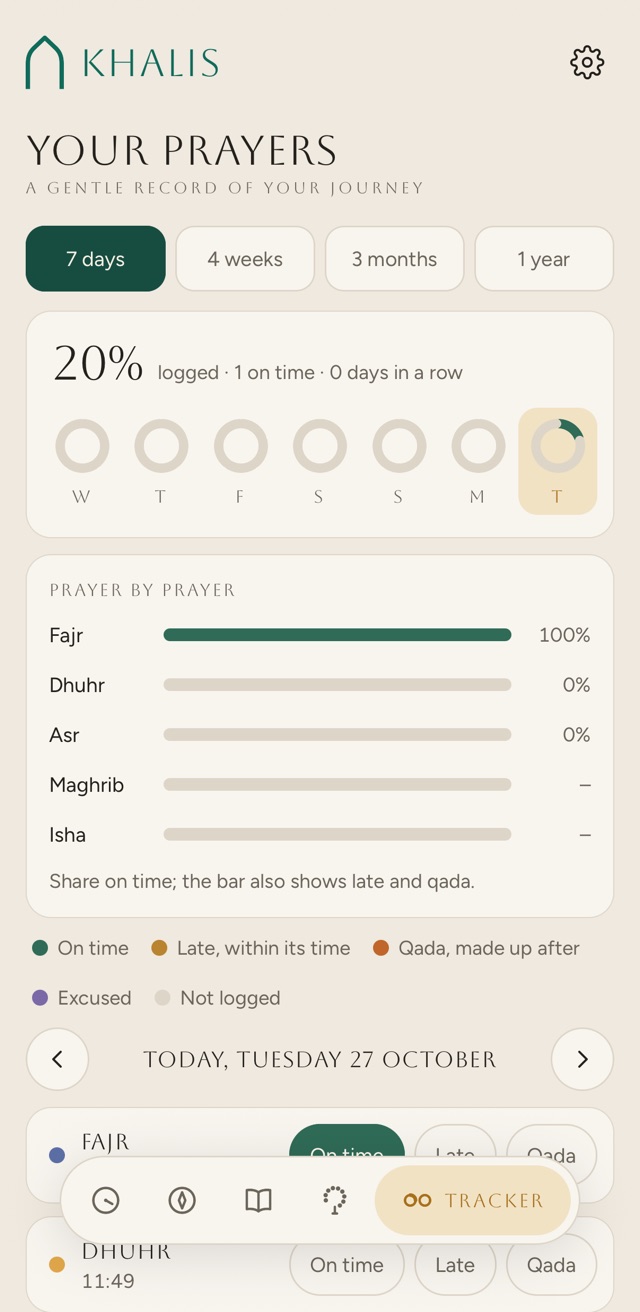
Three marks, after you pray
Open the Tracker tab and tap how it went. That is all it asks of you.
- On time
Prayed within its time.
- Late
Prayed late, before its time ended.
- Qada
Made up after its time ended.
- Excused
A fourth choice while menstruation mode is on for that day. More on that below.
- Not logged
A pale gap in the ring. Days before you started using the tracker don’t count as missed.
Where you do it
- On the Tracker tab. Below your rings, the day’s five prayers are listed with their times, each with On time, Late and Qada.
- Not before its time. A prayer that hasn’t begun shows when it starts, and can’t be marked as prayed yet.
- Any earlier day. Step back with the arrows, or tap a day’s ring, and log it there. On a day ahead, prayers can be logged once the day arrives.
- Changed your mind? Tap the same mark again and it clears.
- The day’s fast sits just below, so you can log it with your prayers. More on fasting.
- Missed prayers. Below that, a line shows how many prayers you have left to make up from before you started, and opens the place to work them out and count them off.
Each day becomes a ring
Five segments, Fajr at the top and on round to Isha, each in the colour of how you marked it. Choose how far back to look.
- 7 days: a ring for each of the seven days up to the one you’re looking at. Tap a ring to open that day.
- 4 weeks: the last 28 days, as four rows of smaller rings.
- 3 months and 1 year: a bar for each week, or each month, showing the share of prayers logged.
- The line above the rings or bars gives the share logged, how many were on time, your days in a row, and your best run when it is longer than this one.
- Prayer by prayer: how often each prayer was on time, with late and qada in the same bar. A prayer whose time hasn’t come yet today isn’t counted.
- Days in a row: a day counts once all five prayers are logged or excused. Today joins the run when it is complete.
An example week
Not real dataMonday to Sunday, seen on Sunday night. A period began on Thursday after Dhuhr and ended on Saturday before Maghrib, and Sunday’s Isha isn’t logged yet. Turn on menstruation mode for Thursday, Friday and Saturday, and watch the days in a row.
66% logged · 19 on time · 0 days in a row · best 3
Thursday
- Fajr
- Dhuhr
- Asr
- Maghrib
- Isha
Share on time; the bar also shows late and qada.
- On time
- Late, within its time
- Qada, made up after
- Excused
- Not logged
Excused, not missed
Some days, some prayers aren’t yours to pray. Menstruation mode records that, day by day or one prayer at a time, so those days don’t read as gaps.
Khalis records what you tell it. It doesn’t decide which prayers are excused or whether any are owed; for that, follow your own scholars.
Kept on your phone. Deleted when you say.
There is no account and no server of ours behind the tracker. The privacy policy has the whole picture.
- On your phone
Your prayer record is saved in Khalis’s own storage on the phone. Khalis doesn’t send it anywhere. It goes where you take it: to your own iCloud if you turn on sync, or into a backup file you save.
- iCloud sync
In the iPhone app, a switch in Settings keeps your prayer and fasting record, bookmarks, memorisation, saved places and settings the same on your iPhone and iPad, through your own iCloud. It is off until you turn it on. Your location and Zakat figures stay on each device.
- Backup
Save everything to one file and keep it wherever you like, then restore it on a new phone. It holds your settings, prayer record, bookmarks and memorisation.
- Deleting it
Settings › Your data › Tracker history › Clear, then Delete it all. It removes your prayer record and menstruation days; your fast log and your missed prayers estimate stay. Keep is right beside it if you change your mind, and the app suggests a backup first. With iCloud sync on, your other devices delete it too.
After Isha, the night has its own hours
On the Today screen, under the day’s prayer times, Khalis shows two more: the middle of the night, and the start of its last third. You can move or hide them in Settings › Today screen.
- How they’re worked out
The night runs from Maghrib to the next day’s Fajr. The middle is halfway through, and the last third begins two thirds of the way. With the Jafari method the night is counted from sunset.
- Your times, your night
They come from the times you see, so adjusting Maghrib or Fajr to match your mosque, or loading its timetable, moves them too. With Jafari the night starts at sunset, so only Fajr changes it.
- Any day
Step to another day on Today and they follow it.
- Maghrib
- –
- Middle of the night
- –
- Last third
- –
- Fajr
- –
The night is – long, so each third is –.
Worked out in your browser with the Adhan library and city list the app uses, and the method the app picks for each city. Nothing is sent anywhere.
A wake-up for the last third
In Settings › Fasting and night prayer, turn on Wake me for tahajjud. It stays off until you do, and once it is on, it shows when it will next ring.
- When: at the start of the last third of the night, or a set time before Fajr: 15, 30, 45, 60 or 90 minutes (60 until you change it).
- Notifications on: turning it on asks for permission, and if notifications are later off for Khalis, the Today screen warns you, with a tap through to fix it.
- Planned ahead with your other reminders, up to 30 days. If they reach the number your phone allows, one of them, about half a day before the plan runs out, asks you to open Khalis so it can plan the next.
- iPhone
A time-sensitive notification with your phone’s standard notification sound, so a Focus that allows time-sensitive notifications from Khalis lets it through.
- Android
An alarm-clock alarm, which battery savers don’t delay; your phone shows an alarm icon for it. It uses the loud Athan channel, not the one for early reminders, so silencing those leaves it on.
The adhan, reminders and the reminder check are on the Prayer times page.