On time, wherever you are
Prayer times worked out on your phone for where you are, with the method most mosques there follow. When they don’t match your mosque, make them match. Your location is not sent anywhere.
- 13calculation methods
- 45cities built in
- 3sounds for the adhan
- ±60minutes, to match a mosque
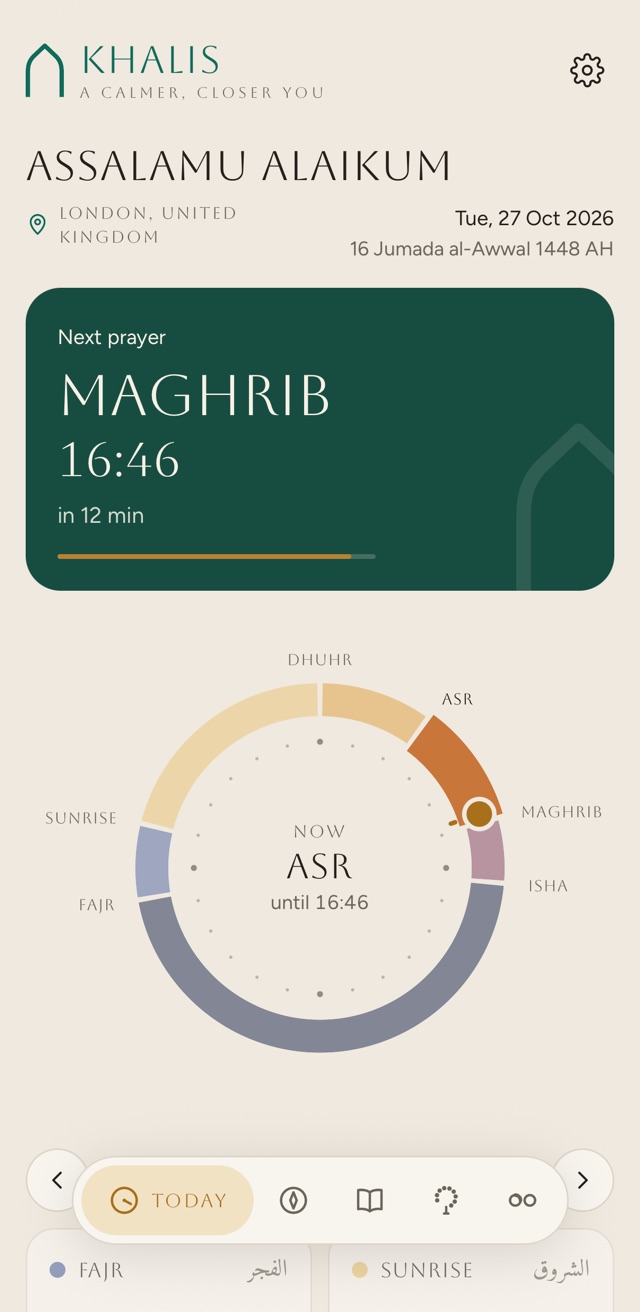
The place, the method and the clock
Khalis works out Fajr, sunrise, Dhuhr, Asr, Maghrib and Isha on the phone itself, with the open source Adhan library, for today or any other day. It needs no account and no connection.
- Where you are
Use your location, pick one of 45 built-in cities, or type a latitude and longitude. A position from GPS is named after the nearest built-in city within 60 km, without asking any server.
With your location in use, Khalis checks it each time you open the app and updates the times when you have travelled. Until you choose, it shows London.
- The method
Automatic picks the method most mosques in your area follow, and Today says which, for example “Moonsighting Committee (chosen for London)”. You can choose any of the 13 instead.
- Asr
Standard (Shafi’i, Maliki, Hanbali), or Hanafi, which is later in the afternoon.
- High latitudes
For places where twilight lasts all night in summer: Automatic, Middle of the night, Seventh of the night or Twilight angle. Automatic uses the seventh of the night above 48° north, and the middle of the night elsewhere.
- The clock
24 hour to begin with, or 12 hour if you prefer it.
- The night
Today shows the middle of the night and the start of its last third, counted from Maghrib to the next Fajr (from sunset with the Jafari method). The tahajjud alarm can wake you for the last third.
- Other days
Step a day back or forward beneath the sundial, and Back to today brings you home.
The 13 methods
As the app lists them. Each sets how far below the horizon the sun must be at Fajr and at Isha (or, for Isha, a set time after sunset), and some add a few minutes of their own.
- Moonsighting Committee
- Muslim World League
- ISNA (North America)
- Egyptian General Authority
- Umm al-Qura, Makkah
- University of Islamic Sciences, Karachi
- UAE (Dubai)
- Qatar
- Kuwait
- Singapore / Malaysia
- Diyanet (Türkiye)
- Institute of Geophysics, Tehran
- Shia Ithna Ashari (Jafari, Leva Institute, Qum)
What Automatic picks
In one of the built-in cities, the method listed for it. A GPS position within 60 km of one takes that city’s method too. Anywhere else, Khalis goes by the phone’s time zone.
| Phone’s time zone | Method |
|---|---|
| London | Moonsighting Committee |
| Any in the Americas | ISNA (North America) |
| Riyadh or Aden | Umm al-Qura, Makkah |
| Dubai or Bahrain | UAE (Dubai) |
| Qatar | Qatar |
| Kuwait | Kuwait |
| Cairo or Khartoum | Egyptian General Authority |
| Istanbul | Diyanet (Türkiye) |
| Tehran | Institute of Geophysics, Tehran |
| Karachi, Kolkata or Dhaka | University of Islamic Sciences, Karachi |
| Kuala Lumpur, Singapore or Jakarta | Singapore / Malaysia |
| Anywhere else | Muslim World League |
The 45 built-in cities, by method
- Moonsighting Committee
London, Birmingham, Manchester
- Muslim World League
Dublin, Paris, Berlin, Amsterdam, Muscat, Amman, Jerusalem, Beirut, Baghdad, Casablanca, Tunis, Algiers, Lagos, Nairobi, Johannesburg, Sydney
- ISNA (North America)
New York, Chicago, Houston, Los Angeles, Toronto
- Egyptian General Authority
Cairo, Alexandria, Khartoum
- Umm al-Qura, Makkah
Makkah, Madinah, Riyadh, Jeddah
- University of Islamic Sciences, Karachi
Karachi, Lahore, Dhaka, Delhi
- UAE (Dubai)
Dubai, Abu Dhabi, Manama
- Qatar
Doha
- Kuwait
Kuwait City
- Singapore / Malaysia
Kuala Lumpur, Singapore, Jakarta
- Diyanet (Türkiye)
Istanbul
- Institute of Geophysics, Tehran
Tehran
Compare the methods
One city, one day, thirteen ways of working it out. Choose a city from the app’s list to see each method’s times side by side, with the one Khalis picks there marked.
| Method | Fajr | Sunrise | Dhuhr | Asr | Maghrib | Isha |
|---|
Worked out in your browser with the Adhan library and the settings the app uses: its automatic high-latitude rule, each method’s own extra minutes, and its Maghrib for the Jafari method. In the app you can then shift any time to match your mosque. Nothing here is sent anywhere.
Match your mosque
Mosques often add a few minutes to calculated times, or print their own timetable. Khalis can follow either, and your reminders follow too.
What the timetable file should look like
Date,Fajr,Fajr Jamaat,Sunrise,Dhuhr,Dhuhr Jamaat,Asr,Asr Jamaat,Maghrib,Isha,Isha Jamaat
01/11/2026,05:31,06:00,07:00,11:51,13:00,14:01,14:30,16:30,18:00,19:30
02/11/2026,05:33,06:00,07:02,11:51,13:00,14:00,14:30,16:28,17:58,19:30- One row per day, with a Date column (or Day and Month columns) and the six times: Fajr, Sunrise, Dhuhr, Asr, Maghrib and Isha.
- Jamaat or iqama columns are optional. If the sheet has a second, Hanafi Asr, it is used when you choose Hanafi Asr.
- 12 and 24 hour times both work, and Khalis works out whether dates are written day first or month first from the rows themselves.
- Commas, semicolons or tabs between the columns. A “Fajr ends” column stands in for sunrise when there isn’t one.
- Rows it can’t read are skipped, and Khalis tells you how many, and which was the first, before you use it.
- It belongs to where you loaded it, and is used within 50 km of there. Khalis tells you when it is about to run out, and uses calculated times, with your shifts, on days it doesn’t cover.
The adhan, your way
For each of the five prayers, choose whether the adhan comes, how it sounds, and whether you’d like a word beforehand.
- A chime, a short adhan or the full adhan, set for each prayer, with Listen to hear it first. Until you choose, each prayer uses the chime.
- Before the adhan: a reminder 5, 10, 15, 20 or 30 minutes ahead.
- Before iqama: 5, 10 or 15 minutes ahead, once the prayer has an iqama time.
- The bell on each prayer on Today turns its adhan on or off. Press and hold it for the rest of the settings.
- On Android, the adhan and the early reminders have their own notification channels, so you can quieten the reminders and keep the adhan.
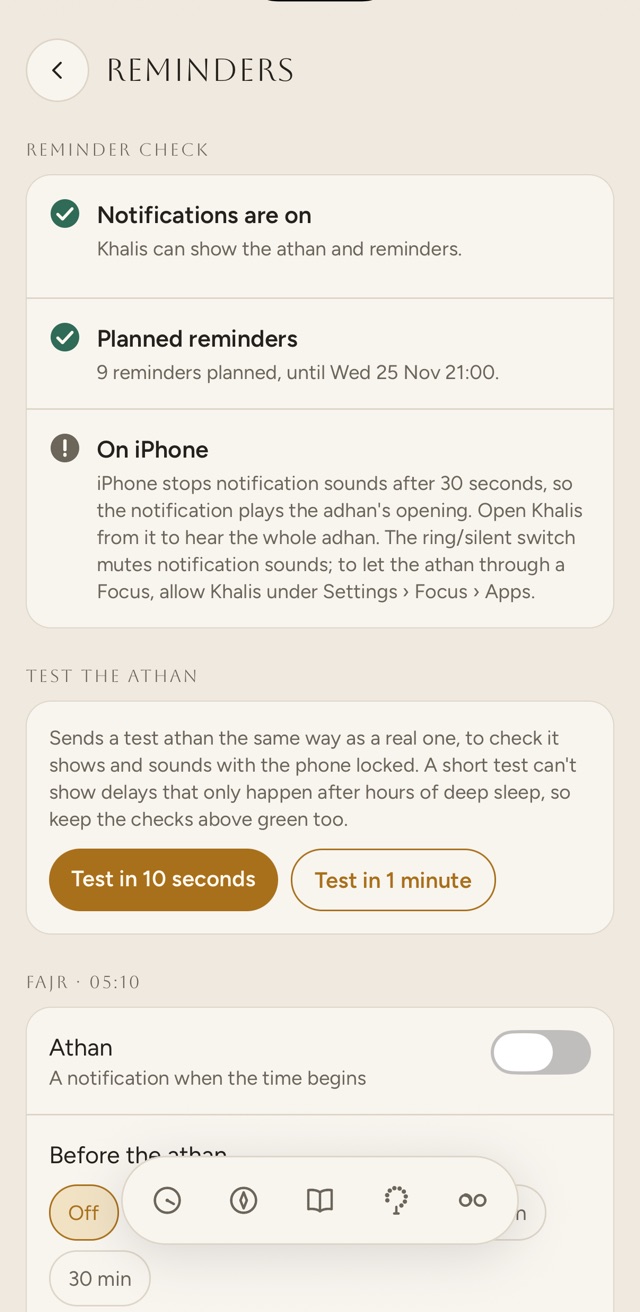
The reminder check
Phones are built to save battery, and some hold notifications back to do it. At the top of Reminders, Khalis checks what could stop the adhan arriving on time on your phone, and helps you fix it.
- NotificationsOn or off, with a button to allow them or to open Settings.
- Exact timingAndroid’s “Alarms & reminders” switch. Without it, Android can hold the adhan back, sometimes by an hour while the phone sleeps.
- Battery optimisationOn Android, set Khalis to “Not optimised” or “Unrestricted”.
- One more step on this phoneSamsung, Xiaomi, Redmi, Poco, Huawei, Honor, OnePlus, Oppo, Realme and Vivo add settings of their own. Khalis names the one on your phone and links to a step-by-step guide.
- Planned remindersHow many are waiting, and until when.
- Test the adhanA test sent the same way as a real one, in 10 seconds or 1 minute, to check it shows and sounds with the phone locked.
If notifications, exact timing or battery optimisation need fixing while reminders are on, Today warns that the adhan, or your reminders, may be late or missing, and a tap takes you to the fix.
On iPhone
- iPhone stops notification sounds after 30 seconds, so with the short or full adhan, the notification plays its opening, faded out by the 30 second mark.
- With the short or full adhan, the whole adhan plays in Khalis when the app is open at prayer time, or when you open it from the notification within ten minutes. A bar at the top stops it from any screen. This is on to begin with; switch it off under “The whole adhan”.
- The adhan is a Time Sensitive notification, so it can come through a Focus you have allowed Khalis in. The ring/silent switch mutes notification sounds.
- iPhone lets an app keep 64 notifications waiting, so Khalis plans up to 60 ahead. If that doesn’t reach 30 days ahead, a reminder about half a day before the plan runs out asks you to open Khalis so it can plan more.
On Android
- With the short or full adhan, the whole recording plays from the notification itself.
- Strict timing delivers the adhan as an alarm, through Android’s alarm clock, which battery saving does not hold back. An alarm icon shows in the status bar. It needs exact timing on first.
- After the phone restarts, unlock it once. Until then, Android holds reminders back.
- Reminders are planned up to 30 days ahead, and topped up each time you open Khalis.
The Qibla, with or without a compass
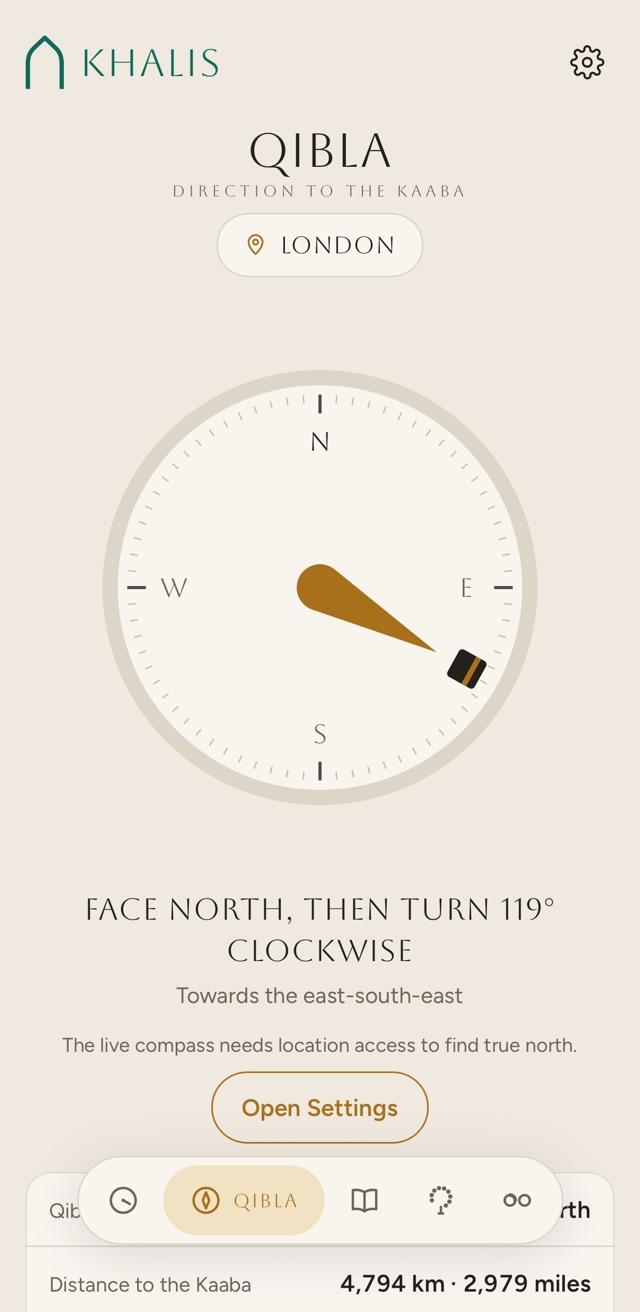
A live compass that turns with you, says which way to turn, and gives the distance to the Kaaba beneath.
- The live compass works from true north. It needs location access to find it, and asks for a slow figure of eight when it needs calibrating.
- Turn left or right by the degrees it shows, until the Kaaba sits under the marker at the top. Within 4°, it says you’re facing the Qibla and the phone gives a short buzz.
- No compass reading? It gives the bearing in words instead: face north, then turn so many degrees, towards a named point of the compass.
- The distance to the Kaaba, in kilometres and miles.
- In the Haram, within about 150 metres of the Kaaba by GPS, it simply asks you to face the Kaaba.
No compass? Use the sun
At certain moments of the day the sun stands in the Qibla direction, or exactly behind it so that your shadow points the way. The app lists today’s for your place. Here they are for a city from its list.
- Qibla direction
- Without a compass
- Distance to the Kaaba
Today
Twice a year, in late May and mid July, the sun stands directly over the Kaaba. At that moment it is in the Qibla direction from anywhere it is up, and the app shows the next one.
The next prayer, without opening the app
A Next prayer widget for the Home Screen on iPhone and Android, and for the iPhone Lock Screen. Khalis hands it the coming days’ times, so it moves on to each prayer as it begins without the app running.
Drawn from the widget layouts in the app, with London’s times on 27 October 2026, twelve minutes before Maghrib.
- Home Screen
iPhone: small and medium. Android: one Next prayer widget. Each shows the place, the next prayer and its time, and all but the small one show the prayer after it.
- Lock Screen
iPhone: rectangular, with a countdown, and inline, a single line above the clock.
- The countdown
A Live Activity counting down to the next prayer, on the Lock Screen and in the Dynamic Island. Turn it on under Reminders, Lock Screen. iPhone lets it move on to the next prayer only when Khalis is opened, so until then it shows that the prayer has begun. Swipe it away and it stays away until the next prayer.
Home, away, and the month you’re in
Saved places
Save home, work or somewhere you travel to, and switch between them with one tap from the place picker on Today, the Qibla screen or Settings. Forget one with another tap.
- A place saved from GPS is kept to about a kilometre, which is plenty for prayer times and says less about where you live.
- With iCloud sync on, which you turn on yourself, your iPhone and iPad share your saved places through your own iCloud. The place you are using now stays on each device.
The Hijri date
Today and the month timetable show the Hijri date from the Umm al-Qura calendar. Where your local moon sighting puts the month a day or two apart, shift it, and the shift carries through to Ramadan and the fasting days.
- 2 days earlier
- 1 day earlier
- As calculated
- 1 day later
- 2 days later
For today, worked out in your browser. On a phone that can’t do Umm al-Qura, Khalis uses the tabular Islamic calendar, which can differ by a day.