Ramadan, and the fasts between
In Ramadan, Khalis puts suhoor and iftar at the top of your day. The rest of the year, it can remind you of the sunnah fasts the evening before, and keep count of the fasts you still owe. Every fasting reminder is off until you choose it.
- 4kinds of sunnah fast
- 2optional Ramadan reminders
- ±2days of Hijri shift
Suhoor and iftar, at the top of your day
Through Ramadan, a card sits just below the next prayer on the Today screen (that is where it starts; you can move or hide it in Settings, Today screen). It says which day of Ramadan it is, counts down to the end of suhoor and then to iftar, and gives both times.
- Suhoor ends at Fajr, and iftar is at Maghrib, the same times Khalis shows for your place. Shift them to match your mosque, or load your mosque’s timetable, and the card follows.
- Mark the day as you go: Fasted, Missed or Excused, right on the card.
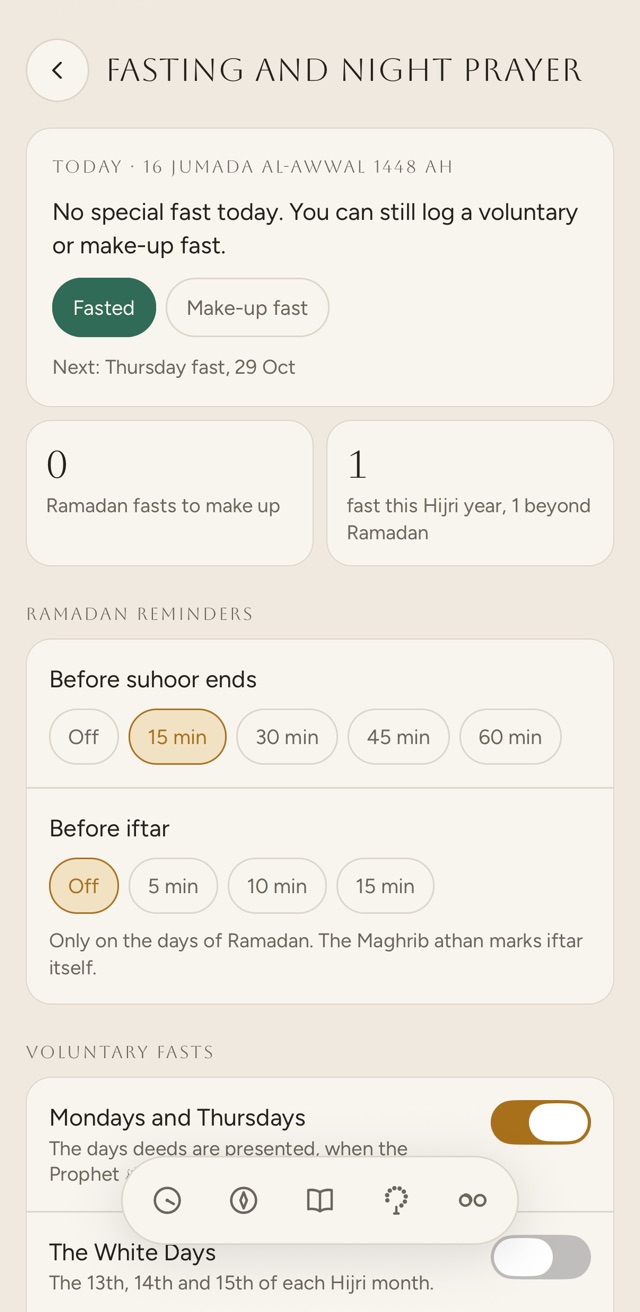
- Tap the card to open the fasting settings.
Two reminders, if you want them
- Before suhoor ends
15, 30, 45 or 60 minutes before Fajr.
- Before iftar
5, 10 or 15 minutes before Maghrib.
Both are off until you pick a time, and both come only on the days of Ramadan. Iftar itself is marked by the Maghrib adhan, if you have it on.
Suhoor ends 05:31 · Iftar 17:25
FastedMissedExcused
-
Khalis
Suhoor ends in 15 minutesFajr is at 05:31 in London. Ramadan day 12.
-
Khalis
Iftar in 10 minutesMaghrib is at 17:25 in London.
The fasts between, remembered the evening before
Turn on the fasts you keep. Khalis marks each one on the day, and reminds you the evening before, so there is time to plan suhoor. All four are off to begin with.
| Switch | Days |
|---|---|
| Mondays and Thursdays | Every Monday and ThursdayMonday fast · Thursday fast |
| The White Days | The 13th, 14th and 15th of each Hijri monthWhite Days fast |
| Ashura and Arafah | 9 and 10 Muharram, and 9 Dhu al-HijjahFast of Tasu’a (9 Muharram) · Fast of Ashura (10 Muharram) · Fast of the Day of Arafah |
| Six days of Shawwal | On Today and in the reminder, marked once, on 2 Shawwal, the day after Eid. The six can be any days of the month.Six days of Shawwal |
The next sunnah fasts
Choose the fasts you keep and see the next ten days Khalis would mark, worked out here in your browser with the app’s own Hijri calendar and rules. Nothing is saved or sent.
The days that come once a year
When each one next falls, by the Umm al-Qura calendar with the Hijri date as calculated. Local moon sighting can move any of them by a day.
- Ramadan begins1 Ramadan 1448The Ramadan card appears on Today
- Eid al-Fitr1 Shawwal 1448No fast
- Six days of Shawwal2 Shawwal 1448Marked on the day after Eid
- Fast of the Day of Arafah9 Dhu al-Hijjah 1448Sunnah fast
- Eid al-Adha10 Dhu al-Hijjah 1448No fast
- The days of Tashreeq11 to 13 Dhu al-Hijjah 1448No fast for three days
- Fast of Tasu’a9 Muharram 1449Sunnah fast
- Fast of Ashura10 Muharram 1449Sunnah fast
A log of the fasts you keep, and the ones you owe
Each day can carry one mark. In Ramadan it is Fasted, Missed or Excused; on other days, Fasted or Make-up fast. Tap a mark again to clear it.
- Fasted
A fast you kept, in Ramadan or on any other day.
- Missed
A day of Ramadan you didn’t fast. It counts as one to make up.
- Excused
A day of Ramadan you were excused from fasting. It also counts as one to make up.
- Make-up fast
Qada, outside Ramadan: a fast that makes up a missed or excused day. Each one takes one off the count.
- Log today on the Ramadan card or the fasting screen.
- Log an earlier day from the prayer tracker: step back to that day, and its fast is there under the prayers.
- Your log stays on your phone. It goes into the backup file if you make one, and on iPhone into your own iCloud only if you turn on iCloud sync.
Shown in the app as “32 fasts this Hijri year, 6 beyond Ramadan”.
Khalis keeps count. It doesn’t rule on what you owe. What counts as excused, and how and when to make a fast up, is for you and your own scholars.
Asked about fasting
My mosque began Ramadan a day later. Can Khalis follow?
Yes. In Settings, change the Hijri date by one or two days, earlier or later. The Ramadan card, the sunnah fasts and their reminders all move with it.
Which Hijri calendar does Khalis use?
Umm al-Qura, worked out on your phone. If a phone can’t work out that calendar, Khalis uses a tabular one (the Kuwaiti algorithm) instead, which can be a day or more out, so check it against your mosque and shift the Hijri date to match. The list on this page does the same in your browser.
Do I have to have the reminders?
No. Every fasting reminder is off until you choose it. When you turn one on, Khalis asks for permission to send notifications if it doesn’t have it yet.
How does it help with the six days of Shawwal?
With the switch on, Khalis marks 2 Shawwal, the day after Eid al-Fitr, and reminds you on the evening of Eid: “The six days of Shawwal can begin tomorrow.” On Today and in the evening reminder, Khalis marks only 2 Shawwal, since the six can be any days of the month. The fasting screen names the six days of Shawwal on each day from the 2nd, and you log each fast you keep.
Does a make-up fast count against a particular Ramadan?
No. Khalis adds up every missed and excused day in your log and takes away every make-up fast, whichever Ramadan they belong to.
In the app, the tahajjud alarm sits on the same screen as fasting. Here it has its own place, with the prayer tracker and the night.