Setting up your prayer times, getting the adhan on time, the Quran, fasting, Zakat and your data. Short answers, in the words the app uses, so you can find each setting.
Try a shorter word, or clear the search and look through the topics.
Getting started
Where you are, how the times are worked out, and how to make them match your mosque.
Should I use my location, or pick a city?
Either works. Until you choose, Khalis shows London’s times, with a card on the Today screen offering to use your location.
Use my location. Tap it on the Today screen, or in Settings › Location. Khalis reads your position once and names it after a nearby city from its own list. If you leave it on, it checks again whenever you open the app, so the times follow you when you travel.
Pick a city. Tap the place name on Today, or Change in Settings › Location, and search the 45 cities built into Khalis.
Type coordinates. Enter a latitude and longitude in Settings › Location. The times then use your phone’s time zone.
In the same city list you can save places you go often, such as home and work, and switch between them with one tap.
Where does my location go?
It stays on your phone. Khalis works out prayer times and the Qibla there with the open-source Adhan library, and names your place from its own list of cities without asking any server.
Your current location isn’t synced to iCloud. Places you save are, rounded to about a kilometre, if you turn sync on. A backup file you save holds your location as it is on the phone, so keep it somewhere private.
A place you save from your location is kept to about a kilometre, which is plenty for prayer times. If you’d rather not share your location at all, pick a city or type coordinates instead. There is more in the privacy policy.
Which calculation method does it use?
The one most mosques in your area follow, chosen for you: the Moonsighting Committee in the UK, ISNA in North America, Umm al-Qura in Saudi Arabia, Diyanet in Türkiye, and so on. Where Khalis has nothing better to go on, it uses the Muslim World League.
To choose another, go to Settings › Calculation › Method. There are 13 to pick from. In the same place you can set:
Asr time: Standard (Shafi’i, Maliki, Hanbali), or Hanafi, which is later in the afternoon.
High latitude rule, for places where twilight lasts all night in summer: automatic, middle of the night, seventh of the night, or twilight angle.
Shift any time, from Fajr and sunrise to Isha, by up to 60 minutes earlier or later. Your reminders follow the shifted times.
Set iqama times as minutes after the adhan, up to two hours, in steps of five. They show on the Today screen and can have a reminder of their own.
Load your mosque’s timetable. Under Settings › Mosque timetable, choose a CSV file or paste the text: one row per day, with a Date column and the six times, plus jamaat or iqama columns if it has them. 12 and 24 hour times both work. Khalis uses it on the days it covers, within 50 km of where you loaded it, and tells you when it is about to run out.
Mosques often add a few minutes to calculated times, or follow a different method. If shifting doesn’t settle it, try another method under Settings › Calculation. More on the Prayer times page.
What can stop an adhan arriving, and how Khalis helps you check.
How do I make sure the adhan arrives on time?
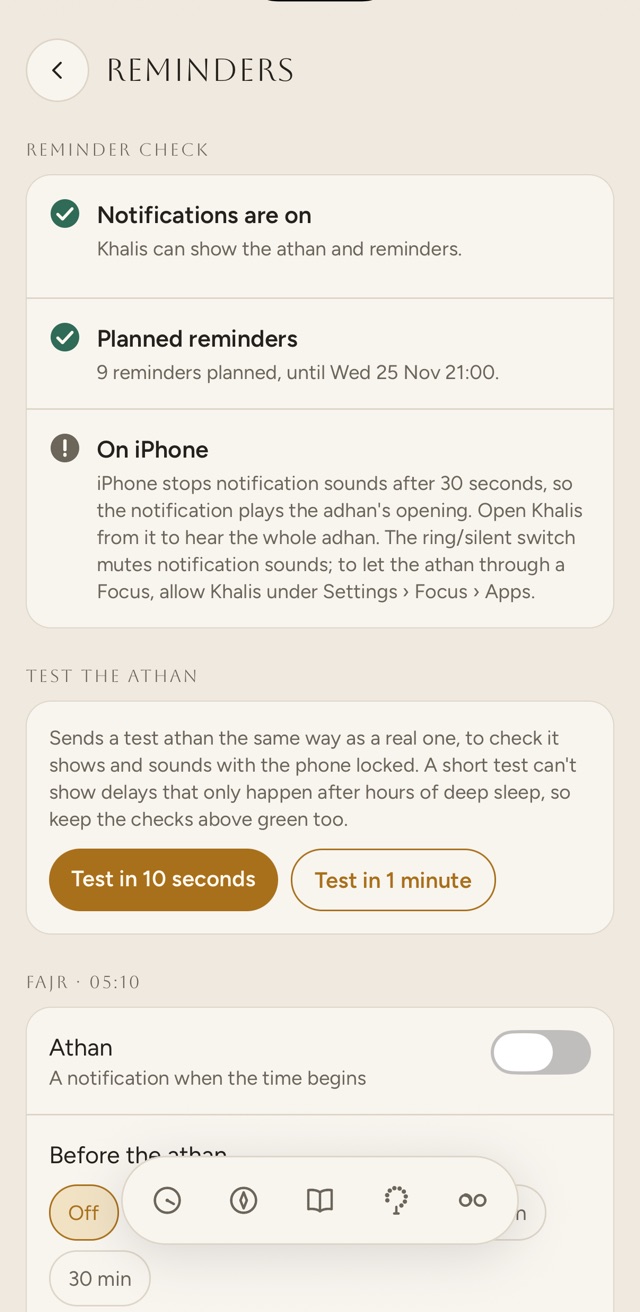
Open Settings › Reminders. At the top is the reminder check: Khalis looks at what could stop an adhan reaching you on this phone, marks each item with a tick or a warning, and puts a button beside anything you can fix. It checks again whenever you come back to the screen, for example from your phone’s settings.
NotificationsiPhone and AndroidWithout them, no adhan or reminder can appear.
Exact timingAndroidAndroid’s Alarms & reminders permission, so the adhan fires at the exact minute.
Battery optimisationAndroidSet Khalis to Not optimised or Unrestricted, so the phone doesn’t hold it back.
One more step on this phoneSome Android phonesAn extra setting some phone makers add, with a step-by-step guide.
Planned remindersiPhone and AndroidHow many reminders are planned, and until when.
After restarting your phoneAndroidUnlock it once. Until then, Android holds back every app’s reminders.
On iPhoneiPhoneWhy the notification plays only the opening of the adhan, and how to let it through a Focus.
The phone makers with an extra step are:
Samsung
Xiaomi, Redmi and Poco
Huawei
Honor
OnePlus
Oppo
Realme
Vivo
If notifications, exact timing or battery optimisation could make the adhan late while reminders are on, the Today screen shows a warning that opens the check.
The reminder check, on iPhone
Will the adhan play when my phone is locked?
Yes, for each prayer you turn it on for. The adhan starts off, so switch it on with the bell beside each prayer on the Today screen, or under Settings › Reminders. There you can choose its sound for each prayer: a chime, a short adhan or the full adhan.
On Android, the whole adhan plays from the notification.
On iPhone, notification sounds stop after 30 seconds, so the notification plays the opening of the adhan, faded out just before the limit. If you chose the short or full adhan, and Khalis is open at prayer time or you open it from the notification within ten minutes, Khalis plays the whole adhan, with a bar at the top to stop it. You can turn that off under Settings › Reminders › The whole adhan.
The ring/silent switch mutes notification sounds on iPhone. To let the adhan through a Focus, allow Khalis under Settings › Focus › Apps in your phone’s settings.
How do I send a test adhan?
In Settings › Reminders, under Test the athan, tap Test in 10 seconds or Test in 1 minute, then lock your phone and wait. The test goes the same way as a real adhan, with the first adhan sound you chose for any prayer, or the chime, and Khalis shows the time it is due, to the second.
If it comes late or not at all, fix whatever is marked in the reminder check above it. A short test can’t show delays that only happen after hours of deep sleep, so keep those checks clear too.
My adhan comes late on Android. What should I change?
Work down the reminder check in Settings › Reminders.
Exact timing. On Android 12 and later, turn on Alarms & reminders for Khalis; the check has a button for it. Without it, Android can hold the adhan back, sometimes by an hour while the phone sleeps.
Battery optimisation. Tap Open battery settings, and in the list that opens set Khalis to Not optimised or Unrestricted.
Your phone maker’s own setting, if it has one. Khalis shows the step for your phone, and a step-by-step guide from dontkillmyapp.com. The steps it gives are below.
Strict timing. Under Settings › Reminders › Strict timing, turn on Deliver the athan as an alarm. It uses Android’s alarm clock, which no battery saver can delay, and shows an alarm icon in the status bar. It needs exact timing on first.
After a restart, unlock your phone once. Until the first unlock, Android holds back every app’s reminders.
Samsung
Settings › Battery › Background usage limits. Make sure Khalis is not in “Sleeping apps” or “Deep sleeping apps”.
Xiaomi, Redmi, Poco
Settings › Apps › Khalis › Autostart on, and Battery saver › No restrictions.
Huawei
Settings › Battery › App launch › Khalis › Manage manually, with all three switches on.
Honor
Settings › Battery › App launch › Khalis › Manage manually, with all three switches on.
OnePlus
Settings › Battery › Battery optimisation › Khalis › Don’t optimise. Also lock Khalis in recent apps.
Oppo
Settings › Battery › Khalis › Allow background activity, and Auto launch on.
Realme
Settings › Battery › Khalis › Allow background activity, and Auto launch on.
Vivo
Settings › Battery › Background power consumption › allow Khalis.
Can I be reminded before the adhan, or before iqama?
Yes, for each prayer, in Settings › Reminders: 5, 10, 15, 20 or 30 minutes before the adhan, and 5, 10 or 15 minutes before iqama.
An iqama reminder needs an iqama time, from Match my mosque or from your mosque’s timetable. On Android, early reminders have a notification channel of their own, so you can quieten them in your phone’s settings without touching the adhan.
Why does Khalis ask me to open it now and then?
Khalis plans your reminders up to 30 days ahead, and tops the plan up each time you open it. iPhone lets an app keep only 64 notifications waiting, so with many reminders on, Khalis plans up to 60 at a time. When that doesn’t reach far enough, the last one is a note asking you to open Khalis, sent half a day before the plan runs out. Opening the app plans the next ones.
On Android, Khalis can keep up to 450 planned. On either phone, the reminder check shows how many are planned, and until when.
Listening offline, the reciters, the tajweed colours and the revision schedule.
Which translation and reciters are included?
Marmaduke Pickthall’s English translation, which you can turn off, and Tafsir al-Jalalayn in Arabic for each verse. Recitations by Mishary Alafasy, Mohamed Siddiq al-Minshawi, Abu Bakr ash-Shaatree, Hani ar-Rifai, Abdur-Rahman as-Sudais and Mahmoud Khalil al-Husary.
Four of the six: Mishary Alafasy, Mohamed Siddiq al-Minshawi, Abu Bakr ash-Shaatree and Hani ar-Rifai. The word timings come from quran-align by Collin Fair, and Khalis uses them only for reciters whose recordings, as streamed, match the timed ones byte for byte.
Abdur-Rahman as-Sudais and Mahmoud Khalil al-Husary play verse by verse, without the highlighting. The recitation panel says which applies to the reciter you choose.
How do I listen without a connection?
Open a surah and tap Listen, which starts the recitation and opens its panel, then tap Download under Listen offline. Khalis saves the surah verse by verse for the reciter you have chosen, and from then on it plays without a connection.
Each reciter’s downloads are separate, so a surah saved for one still streams for another. To free up space, open the same panel and tap Remove.
Downloads stay on the phone you made them on. They aren’t in a backup file or in iCloud sync, so on a new phone you download them again.
What do the tajweed colours mean?
Tap Tajweed at the top of a surah and the Arabic is coloured by tajweed rule, with this key above the verses:
Not pronounced grey
Madd, 2 counts gold
Madd, 2, 4 or 6 orange
Madd, 4 or 5 red
Madd, 6 counts dark red
Ghunnah green
Qalqalah blue
The colours follow the scheme of the familiar colour-coded mushafs, and the rules come from quran-tajweed by Collin Fair. Tajweed stays on for every surah until you turn it off. See it on a real surah on the Quran page.
How does the revision schedule work?
Turn on Memorise in a surah and tap Memorised on the verses you know. Each one comes back for revision the next day. Each time you have it, the gap grows:
137143060120
Days until a memorised verse comes back. After 120, it keeps coming back every 120 days.
If you miss it, it is marked weak, comes back the next day, and the gaps start again from the beginning. Verses due today wait in the quiz under Quran › Memorisation, and weak verses have a round of their own.
A revision reminder is there if you want it: once a day at the hour you choose, only on days when verses are due, saying how many. Tapping it opens the quiz.
Matching your local moon sighting, reminders for the fasts, and what the Zakat calculator counts.
My mosque started the month a day early. Can Khalis follow?
Yes. Khalis uses the Umm al-Qura calendar. If your local moon sighting differs, go to Settings › Calculation › Hijri date and move it up to two days earlier or later.
Ramadan, Eid, the sunnah fasts and their reminders all move with it.
Can Khalis remind me of voluntary fasts?
Yes. In Settings › Fasting and night prayer, turn on the ones you keep:
Mondays and Thursdays.
The White Days: the 13th, 14th and 15th of each Hijri month.
Ashura and Arafah: 9 and 10 Muharram, and 9 Dhu al-Hijjah.
Six days of Shawwal.
The reminder comes the evening before, so there’s time to plan suhoor, at an hour you choose between 17:00 and 23:00. It is 21:00 unless you change it. For Shawwal there is one reminder, on the evening of Eid al-Fitr, as the six can begin the next day.
Khalis skips Eid al-Fitr, Eid al-Adha and the days of Tashreeq, and gives no voluntary fast reminders in Ramadan.
Can it remind me before suhoor ends, and before iftar?
Yes, on the days of Ramadan: 15, 30, 45 or 60 minutes before suhoor ends at Fajr, and 5, 10 or 15 minutes before iftar at Maghrib. Both are off until you pick a time, in Settings › Fasting and night prayer.
In Ramadan the Today screen also shows the day of Ramadan, when suhoor ends and when iftar is.
How does Khalis count the fasts I have to make up?
In Ramadan you can mark each day Fasted, Missed or Excused. Khalis counts the days marked Missed or Excused, and takes away each make-up fast you log on another day. What you owe is between you and your own scholars; Khalis only keeps the count.
What does the Zakat calculator count?
Settings › Zakat calculator adds up:
Cash and bank: current, savings and cash at home.
Gold, by weight, at 24, 22, 21 or 18 carat. Lower carats count for their share of pure gold.
Silver, by weight.
Shares and investments, at their value today.
Business stock: goods held for sale.
Money owed to you that you expect to get back.
It takes away debts due now (bills and repayments due, not the whole of a long loan), then compares what is left with the nisab: 595 g of silver or 85 g of gold, priced from today’s price per gram that you enter. Silver is chosen to begin with. At or above the nisab, it shows 2.5% as due. You can work in £, $, €, AED, SAR, PKR, INR, MYR, IDR or TRY.
It doesn’t check how long you have held the wealth: Zakat is due on wealth above the nisab held for one lunar year. Scholars differ on personal jewellery, pensions and long-term debts, so follow your own scholar where you’re unsure.
What you enter stays on your phone, and in any backup file you save. It isn’t synced to iCloud. You can try the same calculator in your browser.
There is no account. What you keep in Khalis is on your phone, and moves only when you move it.
How do I move Khalis to a new phone?
Save a backup on the old phone and restore it on the new one.
On the old phone, go to Settings › Your data and tap Save a backup. Keep the file somewhere the new phone can reach: Files, iCloud Drive, Google Drive or an email to yourself.
On the new phone, install Khalis, go to the same place, tap Restore and choose the file. Its name starts with khalis-backup and the date.
Khalis shows when the backup was made and what is in it. Tap Replace my data to use it.
The file holds your settings, your location, prayer and fasting record, bookmarks, memorisation progress, saved places and Zakat figures. Downloaded recitations aren’t in it, so download those again. Khalis never sees the file.
Does Khalis sync with iCloud?
On iPhone, if you turn it on: Settings › Your data › Sync with iCloud. It is off until you do. It keeps your prayer and fasting record, bookmarks, memorisation, saved places and settings the same on your iPhone and iPad, through your own iCloud. Khalis never sees it.
Your location and Zakat figures stay on each device, and so do downloaded recitations. iCloud gives each app only a little room for this; if your data outgrows it, Khalis says so, and a backup file still works.
There is no sync on Android. Use a backup file to move between phones.
How do I delete my history?
To delete your whole prayer record, go to Settings › Your data › Tracker history, tap Clear, then Delete it all. That removes the prayers you have marked and your menstruation mode days. Your fasting log, memorisation and bookmarks stay. If you might want the record later, save a backup first.
One mark: tap the same mark again to clear it, for a prayer or a fast.
A memorised verse: in Memorise mode, tap Memorised or Weak again to take it off.
A saved place: tap × beside it in the city list.
A downloaded surah: tap Remove in the recitation panel.
Khalis has no server of its own holding a copy. Your record is on your phone, and in your own iCloud if you turned on sync. More in the privacy policy.
What it costs, when it arrives, and which phones it is for.
Is Khalis really free?
Yes. Everything in Khalis is free for everyone. There is no premium version, no subscription, no in-app purchases and no ads. It has no servers of its own to pay for, which keeps it cheap to run. The What it costs page goes through it item by item.
When can I get it?
Khalis isn’t in the stores yet. It is coming soon to the App Store and Google Play, in sha Allah.
Is it on Android?
Yes. Khalis is made for iPhone and Android, and it is coming to both stores. Nearly everything is the same on each. The differences come from the phones themselves:
iPhone only: iCloud sync, and a countdown to the next prayer on the Lock Screen and in the Dynamic Island.
Android only: the whole adhan plays from the notification, and strict timing can deliver it as an alarm.
Both: a next-prayer widget, small or medium on the iPhone Home Screen, rectangular or inline on the iPhone Lock Screen, and on the Android Home Screen.
Does Khalis need a connection?
Only to stream recitation, and for iCloud sync if you turn it on. Prayer times, the Qibla, the Quran text with its translation and tafsir, the tajweed colours, the adhkar, the tracker and your reminders all work on the phone without one.